| Quick links: |
|---|
|
Grandstream GXP 2000
Grandstream GXP-2000 is a next generation enterprise IP telephone based on open industry standards. Built on innovative technologies, GXP-2000 features market leading superb audio quality, rich functionalities, and excellent manageability at affordable prices.
NOTE: Do not use the '#' button to 'send' your calls; use the 'send' button instead. There are some instances where pressing '#' will not work as expected.
STEP 1 You must first determine what IP address it received. To do this, press the round menu button, then the down arrow next to it until the display shows: [2] IP Addr Now, press the round menu button again and you will be shown the IP address of your device (e.g. 192.168.0.100) |
STEP 2 Go to any browser equipped computer on your network and enter the address: http://<IP ADDRESS>/ |
STEP 3 You will be prompted to enter a password (the default is "admin"); then click the "Login" button. |
STEP 4 Click on “Account 1” to configure your first line.
|
||
| SIP Server: | sip.voipmatrix.com | 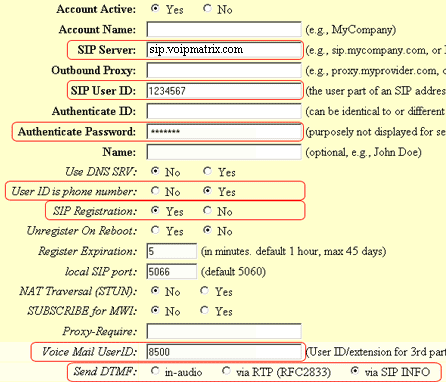 |
| SIP User ID: | Enter the phone number you chose when you signed up for Intpho.net service. | |
| Authenticate Password: | Enter the password that you chose when you signed up for Intpho.net service. | |
| User ID is phone number: | Yes | |
| SIP Registration: | Yes | |
| Voice Mail User ID: | 8500 | |
| Send DTMF: | via SIP INFO | |
STEP 5 Click on the "Update" button at the bottom of the form. |
 |
STEP 6 You will be brought to a confirmation screen on which you will click on the only option available: "Your configuration changes have been saved. They will take effect on next reboot." |
STEP 7 If necessary, continue to configure account 2 to 4. Follow Step 4 to Step 6 |
STEP 8 When all accounts are configured, click on the "Reboot" button at the bottom of the form. |
 |
STEP 9 Make calls! |